Reviewing app changes before they reach the console
A Public Portal prototype gives admins a queue of app differences, a comparison of values from both sources, and a field-level choice before syncing.
- Status
- Prototype inspected in the hosted preview. User outcomes and production sync behavior remain unverified.
When two records disagree
Public Portal and the admin console can hold different details for the same app. An admin needs to see which records need attention, understand what differs, and decide which values to carry forward.
The Custom App Sync prototype brings those decisions into one review queue. Its most substantial interaction is the expanded comparison for a single app. It places the portal value beside the console value and gives each editable field its own choice.
The district catalog behind the task
The PublicPort design document, dated May 13, 2026, describes a district-branded catalog where families, students, and educators find approved apps. District staff curate the records behind that catalog, including approval status, privacy information, integration details, and resource links.
That product context gives the sync task its stakes. A change to an app description affects how visitors understand the resource. A change to an approval status or policy link affects the information they use to assess it.
Two admin needs
The project’s PublicPort persona document describes two administrators whose needs are relevant to this workflow.
The catalog owner needs to find incomplete records quickly. Devon, the district tech director persona, manages imports and app approvals alongside a help desk queue. The persona calls for bulk selection, visible gaps in compliance data, and clear results for each imported record. The Needs review queue and per-app change counts support the first part of that task.
The privacy reviewer needs to inspect a change before applying it. Priya, the data privacy officer persona, needs evidence for compliance decisions and a preview of bulk changes. Comparing a portal value with a console value gives that reviewer a place to inspect a proposed status or policy change. Change history and attribution would need their own evidence.
These documented design personas provide a way to assess the sync interaction. Participant testing of this workflow remains unverified.
Start with the work that needs attention
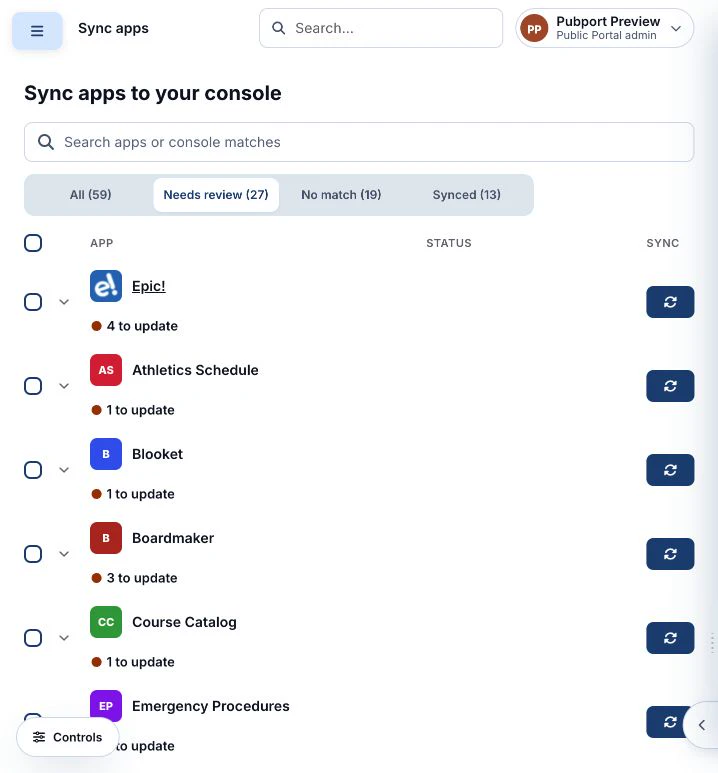
The preview opens on Needs review. Filters also expose All, No match, and Synced, each with a count. The inspected sample contained 59 apps, including 27 in Needs review. Those counts describe the preview dataset.
A row summarizes the work before an admin opens it. Epic! shows 4 to update, while Desmos Classroom shows 2 missing. That distinction gives the admin an initial read on whether they are comparing existing values or filling gaps.
Make the choice at the field
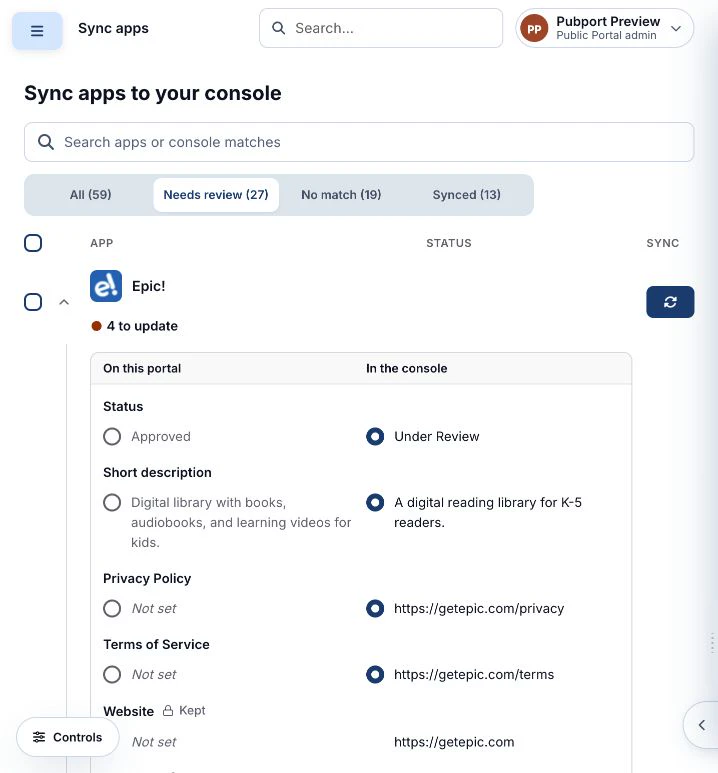
Expanding Epic! reveals two labeled columns, On this portal and In the console. Four fields have a source choice.
- Status compares Approved with Under Review.
- Short description compares two descriptions of the reading app.
- Privacy Policy compares an empty portal field with a console URL.
- Terms of Service compares an empty portal field with a console URL.
The inspected state selects the console value for each of those fields. Website and Rostered appear below with a Kept label and a lock icon. Their treatment distinguishes them from fields with editable source choices.
The comparison makes the scope of a sync visible. An admin can inspect the particular description, status, or policy URL involved before using the row’s Sync 4 fields on Epic! action. The sample also raises a question for validation. When Status differs, how easily does an admin notice that the initial selection is Under Review?
Keep matching and review distinct
The No match filter exposes a separate condition. Expanding Book Creator displays The console has no record of this app. The inspected row presents that information without a field comparison.
The Synced filter contains rows labeled Synced and Nothing to sync. Together, these states give the queue more specific feedback than a single generic complete state.
Scale the action without losing its scope
Each eligible row has a checkbox and a sync control. Selecting Epic! changes the header action to Sync 1 selected app. The page checkbox identifies its scope as Select all 25 on this page.
That wording matters when the filtered result spans pages. It tells an admin how much they have selected before a bulk action. The inspected preview showed 25 of 27 Needs review items on its first page.
What the preview establishes
The review queue, filters, expanded comparison, source-selection controls, unmatched explanation, and selected-app action were inspected in the hosted prototype on November 17, 2026.
The earlier product document and admin personas establish the wider catalog context. The sync action’s persistence, server-side conflict handling, and effect on production records require further verification. Sync-specific research, individual contribution, and measured user outcomes remain open for the author to complete.
A focused admin study could ask participants to find an app with conflicting status values, explain what a sync would change, and select the intended values. Observing unnoticed defaults, incorrect choices, and recovery would show whether the comparison supports accurate decisions.
Project sources and scope
- PublicPort — Design Document, May 13, 2026. Describes the district catalog, admin responsibilities, and app data model in the earlier pubport monorepo.
- PublicPort Personas. Describes catalog ownership, privacy review, and other portal roles. The note provides no participant study results.
- Hosted Custom App Sync preview, inspected November 17, 2026. Supplies the screenshots and observed interface behavior in this case study.
The earlier notes concern the broader PublicPort project. The links between their admin needs and the sync screen are the interpretation developed for this case study.