Synthetic Personas Pipeline — Walkthrough
One command extracts real user signals from PostHog, Linear, Gong, and protoapp-feedback, joins them on email/domain+role, clusters into archetypes, and synthesizes persona docs where every claim cites its evidence. Five phases, four data sources, zero fabricated numbers.
Problem
Discovery-driven personas — the kind you write by reading the codebase and interviewing stakeholders — work when you’re starting from zero. But once three apps are shipping with real users, real support tickets, and real call transcripts, the discovery approach leaves signal on the table. You end up with personas that describe who you think the users are, not who the data says they are.
The per-app pipeline (/portal-personas) already handles single-project persona authoring with an AI-tell rubric. But cross-app patterns — a teacher who uses Launchpad daily and files Linear tickets about My Files, or a parent whose Gong call transcript surfaces a pain point that never makes it into a feedback form — require joining data across sources before clustering can even begin.
/synthetic-personas is the heavier pipeline. It extracts raw signals from four data sources, joins them into unified user profiles, clusters those profiles into archetypes, and synthesizes persona docs where every claim — every pain point, every goal, every device context — cites a source ID back to the record that produced it.
The pipeline at a glance
| Phase | What happens | Output |
|---|---|---|
| Extract | Pull signals from PostHog, Linear, Gong, protoapp-feedback | raw/<source>/<date>.jsonl + _meta.json |
| Join | Merge sources via email-primary, domain+role fallback | joined/users-<date>.jsonl |
| Cluster | Hard segment by role×app, then LLM thematic clustering | clusters/<date>-clusters.json |
| Synthesize | Generate persona docs with evidence citations | personas/<slug>.md + <slug>.sources.json |
| Validate | AI-tell rubric + optional synthetic user walk + freshness index | Reject/regenerate failures, write personas/README.md |
Output lives in dev/design-research/. The skill is idempotent — re-running appends dated snapshots rather than overwriting.
Phase 1: Extract
Four extractors run sequentially, each writing JSONL plus a companion _meta.json that records run timestamps, record counts, and any errors:
PostHog — event counts per user per app, top 20 events per user, session counts, average session length, device and role properties. Keyed on person.properties.email, filtered to production projects. Default window: 90 days.
Linear — customer accounts, customer needs, issues filtered to customer-reported (design-internal review issues are excluded — those aren’t user signal), and comments for verbatim quotes. Keyed on customer email or domain. Default window: 90 days.
Gong — call lists with participants, full transcripts, sentiment markers, verbatim quotes. Keyed on participant email. Default window: 180 days. Requires $env:GONG_API_KEY — if unset, the pipeline continues with three sources and surfaces the gap.
protoapp-feedback — all apps via list_apps, then list_feedback across all statuses, with get_feedback for full body and user identity. Keyed on submitter email. Default window: 180 days.
Pre-flight checks run before extraction. If the research root doesn’t exist, the skill stops and says so. If Gong’s API key is missing, it skips Gong with a warning. Errors during extraction are appended to _meta.json rather than halting — whatever records were captured still get written.
Phase 2: Join
The join strategy has three tiers, documented in reference/join-key-rules.md:
- Exact email match (highest confidence) — records sharing the same email across sources are joined directly.
- Domain + role match (fallback) — when exact email isn’t found, fall back to domain match only when the user’s role also matches. Role matching uses a synonym map (
teacher=educator=instructor=faculty). This prevents false joins in shared-domain districts where hundreds of users share@district.edu. - Orphan rows (partial confidence) — records matching neither criterion are still included but flagged. They carry data from only one source and get lower weight during clustering.
The join phase has a hard gate: if any source’s _meta.json shows errors, zero records, or is missing entirely, it aborts with a clear report of which source failed and suggests re-extraction. No silent partial data.
Output is one row per human in joined/users-<date>.jsonl — email, domain, role, join confidence, apps used, and the full payload from each source that matched.
Phase 3: Cluster
Two-pass approach inside each segment:
Pass 1 — Hard segment. Deterministic split by role × primary_app (e.g., “teacher × launchpad”, “admin × my-files”). No LLM needed.
Pass 2 — LLM thematic clustering. For each segment, the joined rows are fed to Claude with the prompt template at reference/cluster-prompt.md. The prompt asks for 2–4 archetypes per segment based on usage patterns, Linear/Gong language themes, and feature breadth. Every user must be assigned to exactly one archetype.
The mechanism that makes this repeatable is cluster stability. Unless --recluster is passed, the skill reads the most recent prior cluster definitions and includes them in the prompt. Claude is instructed to update, split, or merge existing archetypes rather than inventing new ones. New archetypes get new slugs; retired ones are marked "status": "retired" rather than deleted. Persona slugs stay stable across runs — “The Daily Driver” from last month’s extraction is still “The Daily Driver” this month unless the data clearly shows a split or merge.
Small-N fallback: if a segment has fewer than 5 users, it skips LLM clustering entirely and treats the segment as a single archetype with "thin_data": true.
PII boundary: clusters/ uses anonymized member IDs. The email-to-anon-ID mapping lives only in joined/, which is gitignored.
Segmentation makes the personas useful
Christopher K. Wong makes a useful distinction in “How user segmentation, rather than personas, helps you get design buy-in”: personas help teams understand who a user is, but segmentation helps teams understand how many users are affected and why the business should prioritize them. That distinction sharpened how I think about this pipeline. A synthetic persona can be vivid and still not be decision-grade.
So the pipeline treats each generated persona as the human-readable face of a segment, not as a standalone character sketch. Each cluster should carry the minimum segment metadata needed for prioritization:
- Audience size — how many joined users fit this archetype, plus whether the count is stable or thin-data.
- Time period — the usage window behind the segment, and any seasonal, weekly, or lifecycle pattern that changes the user’s needs.
- Device and context — the actual device, environment, interruption pattern, or access constraint visible in the evidence.
- Customer status — first-time, returning, power user, occasional user, admin, non-admin, or another explicit experience-history marker.
- Business relevance — the product reason the segment matters: retention, activation, support cost, conversion, expansion potential, or risk reduction.
That’s the difference between “The Daily Driver needs faster morning access” and “The Daily Driver represents 43% of active teacher usage in the last 90 days, creates a retention risk when morning login fails, and shows the same complaint pattern in PostHog drop-offs plus Gong calls.” The first statement is empathetic. The second can survive a roadmap meeting.
Phase 4: Synthesize
For each active cluster, the skill generates personas/<slug>.md using the same template schema from /portal-personas (reference/persona-template.md). Same cast-at-a-glance table, same per-persona blocks, same two-column format.
The key difference from /portal-personas: every claim cites a source ID. Each persona gets a companion <slug>.sources.json:
{
  "persona": "the-daily-driver",
  "evidence": {
    "pain_points": [
      {
        "claim": "Login friction during morning rush",
        "source": "gong:call-1284:00:14:22",
        "verbatim": "every morning it's the same thing, kids are waiting..."
      }
    ]
  }
}
Source ID format: posthog:<person-id>:<event-name>, linear:<issue-id>, gong:<call-id>:<timestamp>, protoapp:<feedback-id>. Every pain point, goal, access need, and device context traces back to a record.
Persona docs should also include a lightweight segment card above the narrative: segment size, data window, customer status, primary app, device/context markers, business relevance, and confidence. This keeps the persona from drifting into research theater. The persona helps the team imagine the user; the segment helps the team decide whether the imagined user should change the product.
Name redaction: verbatim quotes in sources.json replace real names with [Name]. Persona docs use fictional names from the template — never real user names.
Freshness detection: when re-running after a fresh extraction, the skill diffs new joined data against existing sources.json files to flag which claims still hold versus which may be stale.
Phase 5: Validate
Three validation steps:
5a — AI-tell rubric. The same five-pattern rubric from /portal-personas Phase 5 runs against every generated persona. Parenthetical access-need tags, parallel-grammar bullets, boilerplate intros, trait-stacking, identity-by-name mappings — any persona that fails two or more tells is rejected and regenerated.
5b — Persona-based validation (optional), in two layers. If current app builds are available, the personas feed a predict-then-observe pass:
- Predict —
/synthetic-user-testing. Reasons through each archetype’s flow and flags the barriers the persona’s described pain points imply. Cheap, broad, no running app required — but the evidence is inferred experience, not observed. - Observe —
/usability-lab. Drives the running prototype with Playwright as each persona, attempts the real tasks, and reports what actually happened: steps-versus-optimal, dead-ends, unreachable targets, focus order, what a screen reader announces. Every finding traces to an observed action and an accessibility-tree snapshot, not inference. It exists to confirm or refute the predictions that matter against the live build — and with--validateit cross-checks each predicted friction point against real PostHog session-recording, rage-click, and drop-off signals, marking it confirmed / refuted / unobserved.
5c — Freshness index. Writes personas/README.md as an index: persona name, cluster, size, data sources, thin-data flag, last extraction date, next suggested refresh.
How the five persona skills relate
/inclusive-personas        → ability-spectrum discovery (per-app, no data sources)
    ↓ called by
/portal-personas           → per-app persona authoring (lightweight, single-invocation)
    ↑ template reused by
/synthetic-personas        → cross-app, evidence-anchored pipeline (this walkthrough)
    ↓ feeds personas into
/synthetic-user-testing    → predicts persona friction by reasoning (cheap, broad)
    ↓ confirmed against the running app by
/usability-lab             → drives the live prototype with Playwright, reports observed friction
/portal-personas is the right tool when you’re standing up a new app and need a persona doc in 10 minutes. /synthetic-personas is the right tool when you have months of real usage data across multiple apps and want the personas grounded in evidence rather than assumptions. Both share the same AI-tell rubric and template format. Both refuse to fabricate numbers.
The two validation skills mirror that same cheap-versus-grounded split: /synthetic-user-testing predicts friction in seconds by reasoning; /usability-lab spends minutes driving the real build to confirm what’s actually true. Predict broadly, then pay for observation only on the predictions that matter.
What ships today
Three docs/personas.md files from /portal-personas runs:
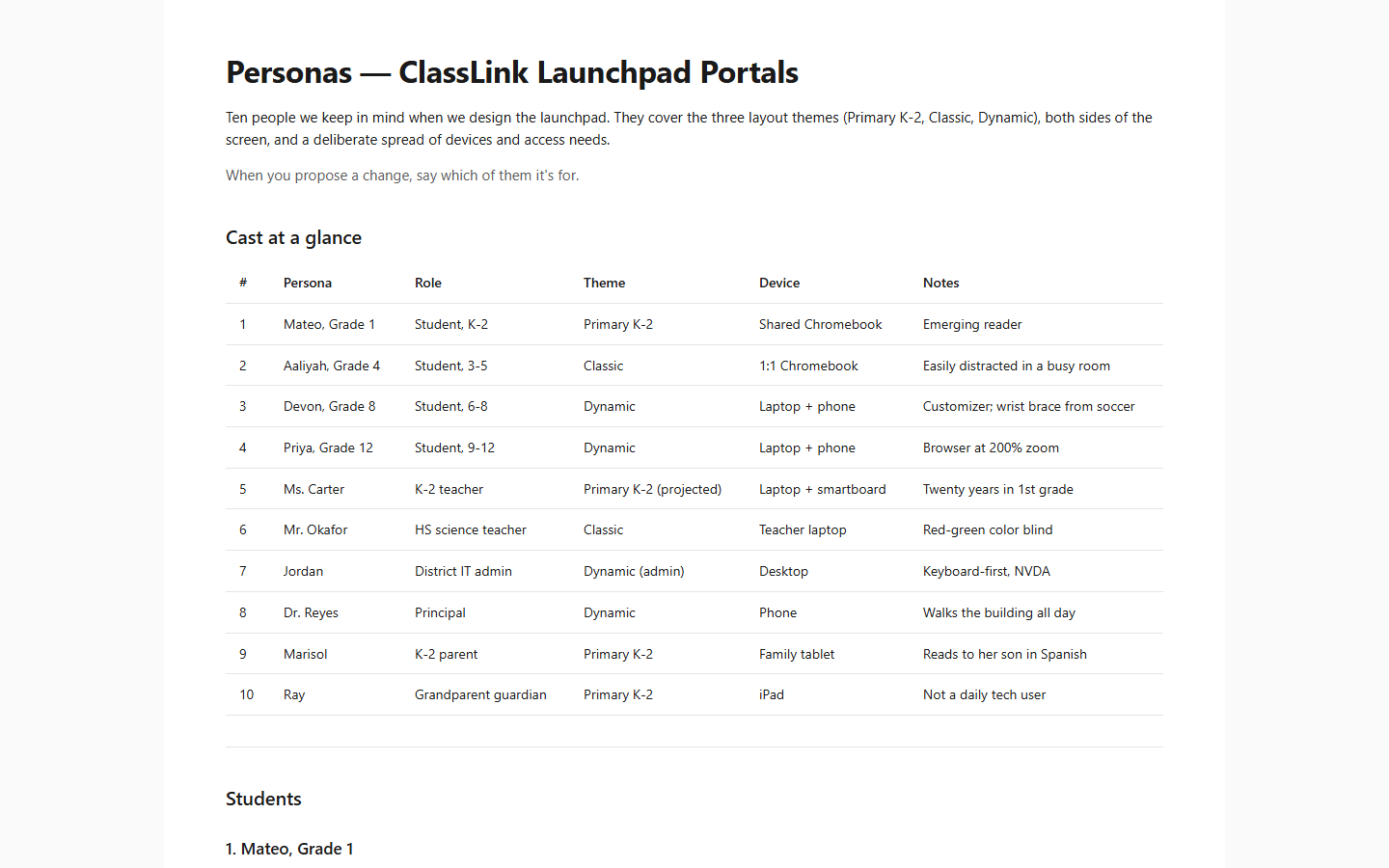
- cl-launchpad-protoapp-new — 10 personas across student / teacher / admin / parent, three layout themes (Primary K-2, Classic, Dynamic)
- parentport-main — 9 personas across parent/guardian and admin
- pubport — 8 personas across portal visitor and admin
The /synthetic-personas pipeline is built and the extraction scripts are wired to all four MCP sources. The Gong integration is scaffolded but requires an API key that hasn’t been provisioned yet — the pipeline runs with three sources in the meantime. No public evidence-anchored persona run has been published. Honest gap — same discipline as Phase 4: if the source ID doesn’t exist, the claim doesn’t ship.
What I’d do differently
- Run the full pipeline against cl-launchpad and publish the output. Until that exists, this walkthrough describes machinery, not results.
- Point
/usability-lab --validateat a shipped flow. The personas now have an executed validation layer — one that drives the live app and cross-checks predicted friction against real PostHog behavior. Running it against the launchpad dashboard would turn these archetypes from described to observed, and produce the first finding on this pipeline that originates outside my own reasoning. - Wire persona IDs into commit messages. “Fixes Devon’s one-handed drag” turns the persona doc into a queryable index of who each change is for.
- The AI-tell rubric should be a standalone skill. It applies to design docs, briefs, even copy reviews — not just personas. Currently it lives inside
/portal-personasPhase 5 and gets reinvented every time a similar tell appears elsewhere. - Make segment cards a first-class output. Wong’s segmentation critique is the missing business layer: each persona should answer “who does this represent, how many people are affected, and why should we act?” before the narrative begins.
- Freshness as a CI check. If
sources.jsonis older than 14 days and the pipeline’s data sources have new records, flag it. Persona docs that cite stale evidence are worse than no citation at all — they create false confidence. - Cluster lineage visualization. The retired/active/split/merge history in
clusters/is machine-readable but not human-scannable. A simple Mermaid diagram showing how archetypes evolved across runs would make the stability mechanism visible.