AI inside the App Detail drawer — three drafts, never one
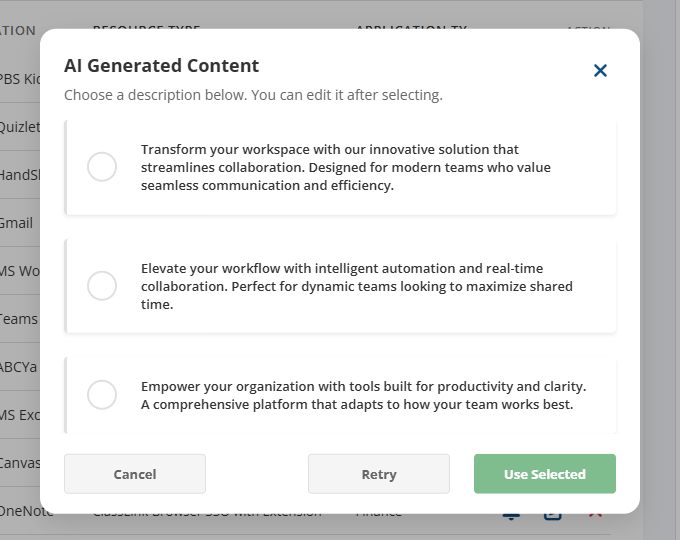
I designed and prototyped a draft picker for district admins writing app descriptions. They can compare three sample drafts and edit their choice. Existing text stays in place until they confirm.
- My contribution
- Interaction design and Angular prototype implementation for the draft picker.
- Status
- Sample-draft prototype. Cancel and selected-draft insertion verified in the hosted preview on November 18, 2026. Live model generation remains unverified.
Problem
District admins write app descriptions inside the Public Portal’s App Detail drawer. The field has a 500-character limit and supplies text for a student’s portal tile. The design question was how to offer writing help while keeping the admin in control of text that students will see.
Evidence and next steps
- Evidence so far
- The prototype demonstrates loading, selection, cancellation, and insertion using sample descriptions. The bulk action only simulates loading and clears the selection; it does not generate descriptions.
- Not yet tested
- Whether comparing three drafts saves admins time, and whether they understand when their existing text will be replaced. No live model quality or user outcome is established here.
- Next test
- Ask admins to compare drafts, cancel once, and then apply an edited choice. Check that they can predict what will happen to their original text.
Technical notes: field integration and prototype state
The flow lives at src/app/pages/pp-add-assign/ in domains-cmc-module. The drawer
itself is a fixed-side panel that opens off the Edit action; the description field is a
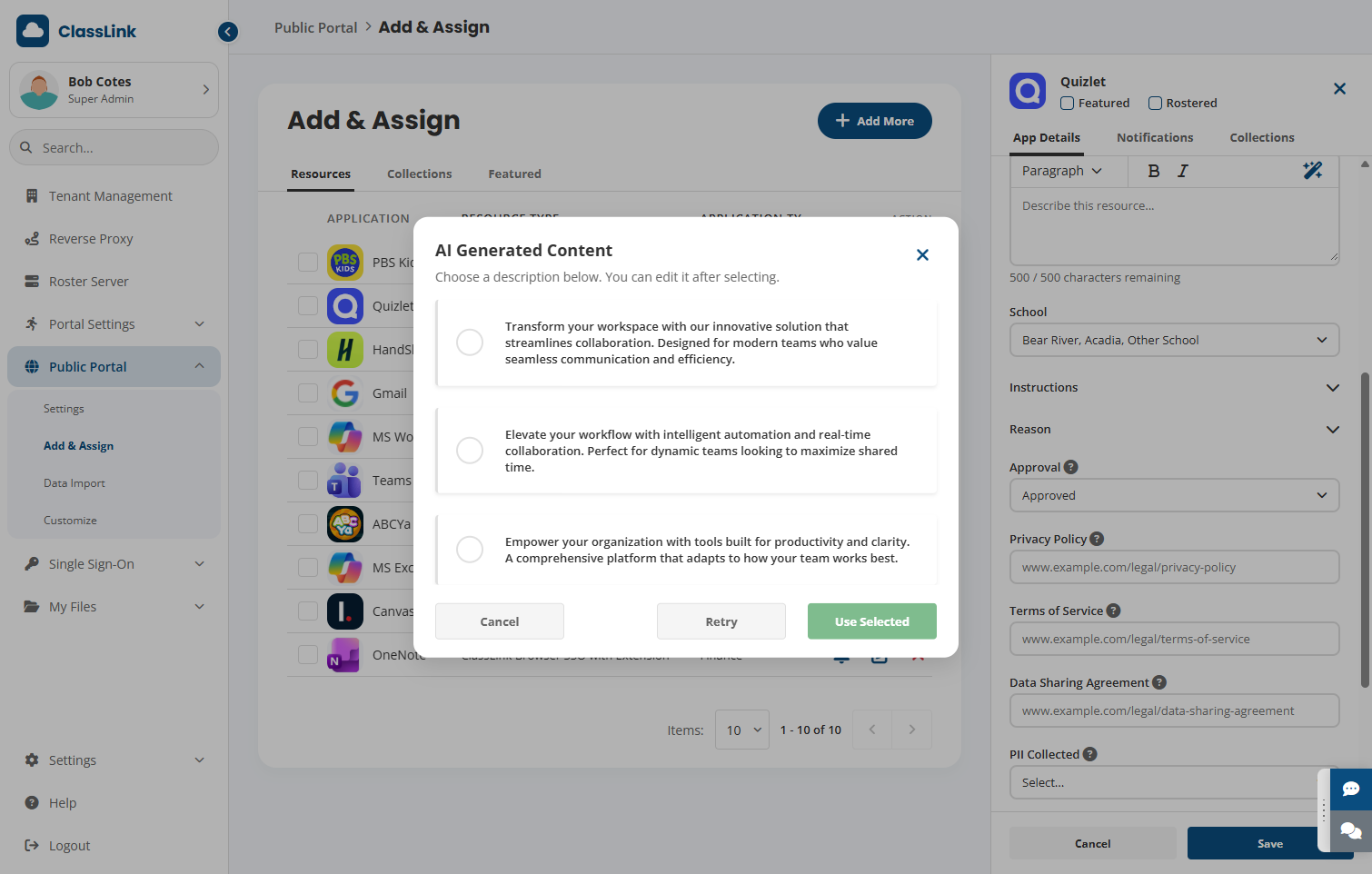
<textarea> wrapped in a .rich-editor container with a three-button toolbar:
Paragraph dropdown, Bold, Italic, AI Generate.
The AI affordance is a wand. fa-wand-magic-sparkles in the same 32px slot as the
bold and italic buttons. No ”✨ AI” label, no separate panel — it sits with the
formatting tools because that’s where the admin’s hand already is.
// pp-add-assign.page.ts (paraphrased)
aiModalOpen = signal(false);
aiGenerating = signal(false);
aiOptions = signal<string[]>([]);
aiSelectedIndex = signal<number | null>(null);

openAiModal(): void {
  this.aiModalOpen.set(true);
  this.aiGenerating.set(true);
  this.aiOptions.set([]);
  this.aiSelectedIndex.set(null);
  setTimeout(() => {
    this.aiOptions.set([...this.aiSampleDescriptions]);
    this.aiGenerating.set(false);
  }, 1200);
}

injectAiResult(): void {
  const idx = this.aiSelectedIndex();
  if (idx !== null) {
    const text = this.aiOptions()[idx];
    if (text.length <= this.resEditDescMaxLength) {
      this.resEditDescription.set(text);
    }
  }
  this.aiModalOpen.set(false);
}
Where the picker fits in the larger admin task
The archived AI Augmentation Strategy describes adding a portal resource as a form with more than eight fields, including description, icon, category, platforms, approval, and privacy information. It identifies the description picker as an existing mock interaction within that larger task.
The strategy’s first proposed expansion was resource enrichment from a pasted vendor URL or app name. It would suggest several metadata fields for an admin to review and edit. That proposal explains a direction the picker could grow toward. The demonstrated three-draft interaction remains the narrower description task.
For a future enrichment flow, the review would need to work at the field level. An admin might accept a description while checking a suggested privacy link or keeping an existing category. That is a design implication of the strategy, with implementation and validation still open.
The decision: review before replacement
An automatic fill would put unreviewed text directly into the field. I chose a separate picker so admins could compare alternatives while retaining their original text. The trade-off is another selection step. Whether that step improves confidence or slows the task down needs a live study; three drafts is a design hypothesis.
Interaction states
- Entry: a wand beside the formatting controls opens the picker in the current task.
- Review: a loading state leads to three selectable drafts. Retry stays in the picker; Cancel leaves the original field intact.
- Apply: Use Selected inserts the chosen draft, which remains editable in the field.
The separate bulk Generate action demonstrates a loading state only. Applying drafts to several rows would need a review step before production use.
Technical notes: simulated bulk action
bulkGenerate(): void {
  this.bulkGenerating.set(true);
  setTimeout(() => {
    this.bulkGenerating.set(false);
    this.selectedResourceIds.set(new Set());
  }, 1500);
}
The single-row flow includes explicit review. A production bulk flow would need its own review step before applying changes.
Technical notes: component ownership and insertion
Architectural choices
- The modal is owned by the page, not the field.
aiModalOpen,aiOptions,aiSelectedIndexare signals on the page component. The textarea doesn’t know about AI; it just receives a string wheninjectAiResult()writes toresEditDescription. Swapping the description field for a different field type later (a<select>for tags, say) doesn’t require porting the modal. - Retry keeps the admin in the picker. The prototype shows how to request another set of drafts without closing the modal or writing to the field.
- The injection writes the full text in one go. Not character-by-character. Streaming into a form field looks impressive in a chat UI and feels broken in a drawer: the admin can’t tell when it’s safe to start editing.
- No silent overwrite. If the admin already typed 200 characters and clicks the wand, the modal still opens — and the existing 200 characters are still in the field behind it. Only “Use Selected” replaces them. Cancel preserves them.
What I’d do differently
- The modal needs a “use the seed I typed” affordance. The sample drafts don’t reflect what the admin typed, such as “for 3rd grade ELL students” into the field. The next iteration should pass the current field value as context: “rewrite this in marketing voice” / “expand on what’s here” / “shorten this.”
- Tone presets are missing. Three drafts feels right, but all three currently land in the same “polished, mildly enthusiastic” register. A row of chips above the options — Plain / Marketing / For students — would let the admin steer regenerations without retyping.
- No undo after injection. Once the text is in the field, the original three drafts are gone. A small ”↶ Try another” pill that appears under the field for 10 seconds after injection would let the admin reopen the picker without losing what they selected.
- Bulk Generate is currently blind. It runs without showing what was generated. Acceptable for a placeholder demo, not acceptable for a production rollout — the bulk flow should land on a review screen showing N drafts with row-level accept/reject.
- The wand icon needs a hover preview. A tooltip on hover that says “Generate three draft descriptions” would close the last gap for admins who don’t recognize the Font Awesome wand glyph as “AI.”
Additional project context from the archive
AI Augmentation Strategy — domains-cmc-module. Identifies the mock description modal, the larger portal-resource form, and a proposed URL/name enrichment flow. The strategy’s estimates of reduced input are planning assumptions. This case study makes no measured time-saving claim.
Verification update
The hosted picker was checked on November 18, 2026 using an unsaved sample description. Opening the picker displayed a loading state followed by three draft options. Use Selected was disabled before a choice. Cancel left the original sample text in the field. Selecting a draft enabled Use Selected, which inserted that draft into the editable field.
The resource drawer then prompted to discard the unsaved changes, and the sample edits were discarded. Saving resource changes, retry variation, bulk generation, live model quality, and assistive-technology behavior remain unverified. The earlier project strategy identifies this as a mock description interaction.